

ToonMe photo cartoon maker
PHOTO LAB DMCC
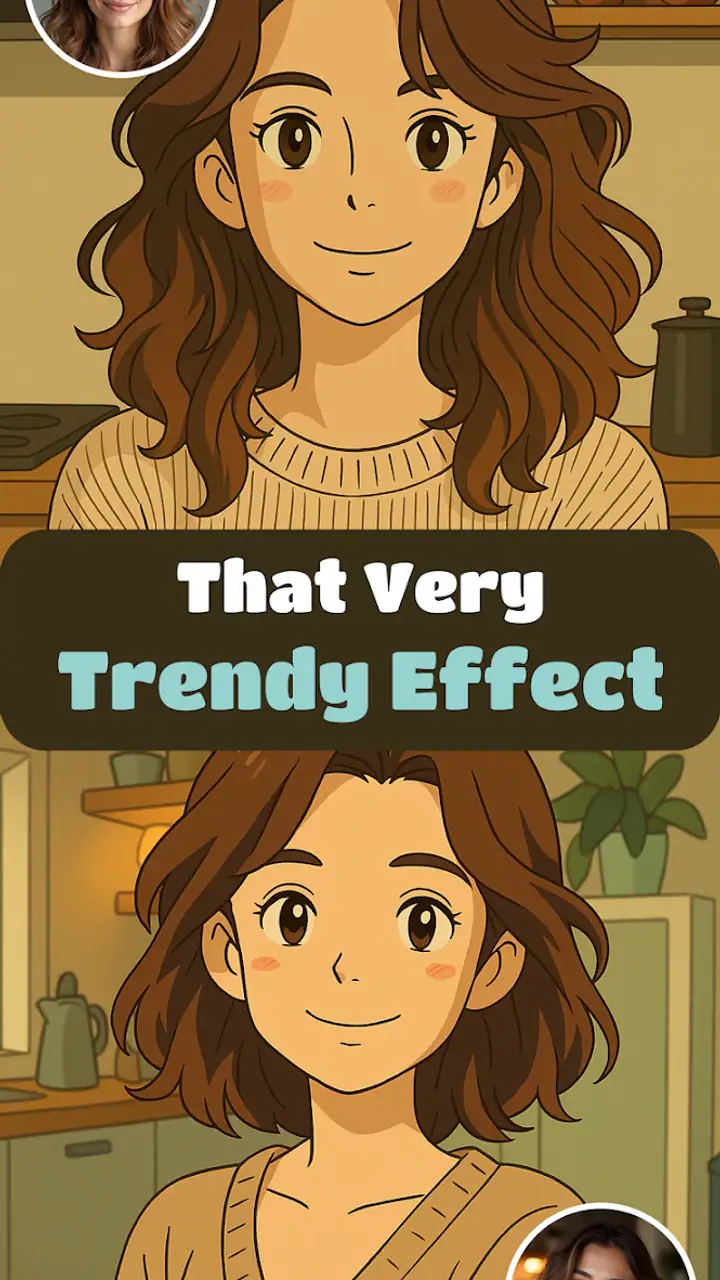
I opened ToonMe expecting a quick way to turn ordinary portraits into cartoon-style images, and that is exactly where this photography app makes the strongest impression. It is built around visual transformation rather than manual editing, so the experience feels more like choosing an artistic direction than learning a complicated editor. I can pick a photo, try a style, compare the result, and decide whether the image feels right without spending a long time adjusting sliders.
That simplicity is important because cartoon effects are easy to make look artificial. ToonMe often works best when the original picture has a clear face, reasonable lighting, and a fairly uncluttered background. When those conditions are present, the result can be a fun profile image, a gift idea, or a quick post for social media. When they are not, I have to be more selective about the source photo and the amount of visual detail I expect the app to preserve.
How ToonMe feels during everyday use
A quick start, with the result doing most of the work
The app is from PHOTO LAB DMCC and belongs firmly in the photography category, although it feels closer to a creative portrait studio than a traditional camera utility. I do not use it to capture photos or organize a gallery. I use it after taking a picture, when I want to give that image a completely different personality.
The first useful habit is to prepare a small selection of source images before experimenting. I get better results from a front-facing portrait with visible eyes and even light than from a dim group photo. This is not a complicated technical requirement, but it makes a noticeable difference to the final effect. If I start with the wrong picture, trying several styles can feel like troubleshooting the app when the real problem is the input.
ToonMe offers hundreds of styles and art lens effects, so the main challenge is not finding something to try; it is stopping at the right moment. The variety is enjoyable for casual experimentation, but it can also turn a simple edit into a long browsing session. I prefer to begin with one clear goal, such as a clean avatar or a playful illustration, rather than opening every available option.
Latest News

Uber Eats Under Pressure: What Happens When Delivery Goes Wrong

How QR & Barcode Scanner Adapts to Android and iOS Innovations

Why Waze Navigation & Live Traffic Is Your Essential Travel Companion

CapCut Mastery: Unleash Hidden Features for Pro-Level Editing

How OS Updates Enhance Roblox Adventures

Teacher Simulator: Exam Time Turns Quick Classroom Judgments into a Repetitive Loop
The best workflow is to judge the original photo before judging the filter. That small change in approach saves time and makes the app feel more consistent. A strong portrait usually gives the effects enough information to work with, while a busy image may produce a result that looks less intentional.
What affects perceived speed
In my experience, the app feels fastest when I use a recent, well-lit portrait and move directly from selection to preview. The creative process is naturally more immediate than working in a full editor because I am not building the image adjustment by adjustment. I choose an effect and evaluate the transformation as a finished visual idea.
That does not mean every style feels equally instant. More elaborate transformations can require more processing than a simple color or line treatment, and the time can vary with the phone and the image itself. I would not choose ToonMe when I need to process a large batch on a strict deadline. It is better suited to making one image feel special than to preparing hundreds of consistent portraits.
Gallery
There is also a practical speed advantage in using a cropped image when the face is small in the original frame. A tighter crop reduces distractions and helps me compare styles more quickly. I keep the uncropped original separately, then make a copy for experimentation. That way, I can try a dramatic effect without worrying about losing the composition I may want later.
Heavy use and the cost of too much experimentation
The app becomes more demanding from a user’s perspective when I repeatedly cycle through styles, especially with high-detail photos. The issue is not only processing time. Repeated previews can make it harder to remember which result actually suited the picture, and saving every variation can quickly clutter the phone’s gallery.
My solution is to narrow the choices in stages. First, I test a few contrasting looks: a softer cartoon treatment, a more graphic illustration, and a bolder art effect. Then I keep only the strongest direction and compare a smaller group within it. This makes the app feel less wasteful and gives me a clearer final decision.
For heavy use, I also avoid editing while the phone is already busy with other demanding tasks. I close anything I do not need, keep enough free storage for exported images, and avoid judging performance from one unusually large photograph. These are ordinary mobile habits, but they matter more in an effects app because each preview may involve substantial image processing.
ToonMe is therefore not a replacement for a professional batch workflow. If I were preparing a consistent set of business portraits, I would want a tool with precise controls, repeatable settings, and a more predictable production process. Here, the strength is creative discovery, not uniform output at scale.
Reliability: what I trust it with
I find the app reliable for casual, one-off transformations when I keep the original photo untouched. That backup habit is worthwhile with any creative editor, especially one designed around strong visual changes. The edited image may become the version I share, but it should not be the only copy of a meaningful family photo or an important personal portrait.
Recovery is easiest when I treat each edit as a separate experiment. I select the source again, test another style, and save only the version I want. This is less frustrating than trying to reverse a result that has already been exported. It also helps me compare styles fairly because I am always starting from the same original rather than from an already transformed image.
Another reliability consideration is expectation. A cartoon effect is an interpretation, not a faithful retouch. Facial details, hair, glasses, shadows, and background elements may be emphasized or simplified in ways I would not choose manually. I see that as part of the appeal, but it means I check the eyes, mouth, and overall likeness before sharing. A result can be attractive while still not looking much like the person in the source image.
The app has a 4.5 average from around 1.9 million ratings, with over 11 thousand written reviews. Those figures suggest that the basic idea connects with a large audience, but they should not replace a personal test with the kinds of photos I actually use. Cartoon effects are subjective, and a style that works beautifully for a close portrait may be disappointing on a pet, a landscape, or a group shot.
Device limits and what to expect on older phones
ToonMe supports devices running Android 6.0 or later, which gives it a broad compatibility range. The current version is 0.7.21, and the app is free to install, with optional purchases ranging from $0.99 to $99.99 per item. I would still separate compatibility from comfort: a phone that can install the app may not provide the same smooth experience as a newer model when processing larger images or switching rapidly between effects.
On a less powerful device, I would begin with smaller photos and a limited number of previews. That approach reduces unnecessary waiting and makes it easier to notice whether the phone is becoming warm or the app is competing with other active tasks. I would also avoid filling the device with every variation. Keeping a tidy working folder is useful because image experiments can consume storage faster than expected.
For someone using an older phone mainly for occasional profile pictures, these limitations may be perfectly manageable. For someone planning frequent high-resolution edits, the experience may feel less comfortable. In that situation, a regular editor with fewer automated transformations could be preferable if it offers more predictable processing and lets the user make smaller, controlled changes.
Where it beats ordinary photo editors
Compared with a standard photo editor, ToonMe gets me to a distinctive result much faster. Traditional editors are better when I want to correct exposure, straighten a horizon, remove a small distraction, or make a series of careful adjustments. They give me control, but that control also means more decisions and more time.
ToonMe is more appealing when the goal is a visible change in mood. I can turn a simple selfie into something that feels illustrated without first learning how layers, masks, curves, or selective adjustments work. That makes it especially approachable for people who want a creative result but do not enjoy editing as a technical hobby.
There is a trade-off, though. A conventional editor lets me protect important details and fine-tune the image around my preferences. ToonMe asks me to accept the personality of a chosen style. If the effect changes the face too much, softens a key detail, or makes the background distracting, I may have fewer ways to correct that specific problem than I would in a manual editor.
Realistic uses beyond a quick selfie
One everyday use is creating a profile image that stands out without looking like a standard beauty filter. I might take a well-lit portrait before a trip, try several illustration styles, and choose one with enough facial resemblance to remain recognizable. The same approach works for a messaging avatar, provided I check the final crop at the small size where other people will actually see it.
Another use is making a personal gift. A portrait of a friend, partner, or family member can become a playful illustration for a card or printed keepsake. I would test the image carefully before ordering anything, because a style that looks charming on a phone screen may exaggerate facial features more than expected when viewed larger.
It can also help when I need a visual starting point. I may use one of the generated looks to decide on a color mood, character concept, or social post theme, then finish the design elsewhere. In that role, ToonMe is not the entire creative workflow; it is a fast idea generator that gives me directions I might not have considered from the original photograph.
I would be more cautious with professional identity photos, formal announcements, or images where accurate appearance matters. The app is designed for stylization, so its greatest strength becomes a weakness when authenticity and precise detail are the priority.
Questions I would consider before installing
If I only want basic brightness, cropping, and color correction, I would skip this app and use the editor already included on my phone. ToonMe earns its place when I specifically want cartoon or art-driven transformations. Installing it for routine photo cleanup would be unnecessary.
If I am worried about paying, the free entry point makes it easy to explore before committing. I would still pay attention to which creative options require an in-app purchase, especially because individual items can range from less than a dollar to nearly one hundred dollars. I would decide based on whether I need a particular style often enough to justify it, rather than buying simply because the preview looks interesting.
If I want to edit a group photo, I would set expectations lower and test several images first. Faces at different angles, uneven lighting, and overlapping people can make a unified cartoon result harder to achieve. A single clear subject is the safer choice when the image needs to look polished.
If I am concerned about losing the original, I would keep the source photo in its normal gallery location and save edited versions as copies. That workflow also makes comparisons easier and protects me from accidentally treating a stylized result as the only available version.
If I need consistent branding, exact colors, or repeatable output, I would choose a more controlled editor. ToonMe is strongest when I want personality and surprise, not when every image must follow a strict visual specification.
My performance verdict
After using it as a creative photography tool, I see ToonMe as a focused and enjoyable option for quick cartoon portraits. It feels most efficient with clear, well-composed source images and moderate experimentation. The app’s large collection of styles gives it more range than a single novelty filter, but that range is also why a little discipline helps: choose a purpose, test a few directions, and save only the result that genuinely works.
Its performance depends on the phone, the image, and the complexity of the chosen effect, so I would not promise identical speed across every device. The broad minimum operating-system requirement is encouraging for older users, while the free installation makes trying it low-risk. Still, people with older or heavily occupied phones should use smaller images, avoid excessive preview sessions, and leave room for exported files.
With more than 100 million installs, it is clearly not a niche experiment, and I understand the appeal. ToonMe removes much of the technical friction between a normal portrait and a shareable illustration. My recommendation is simple: use it when you want a portrait with character, not when you need a precise photo editor.
I would recommend it to casual creators, social media users, families making playful gifts, and anyone curious about seeing their photos in a new visual language. I would not make it my first choice for professional retouching, high-volume production, or images where exact likeness is essential. For the right kind of quick, expressive edit, however, ToonMe turns experimentation into the main attraction rather than an obstacle.
FAQs for ToonMe photo cartoon maker
What is ToonMe, and how does it work?
ToonMe is a photo editing app that transforms your pictures into cartoon-like images. Using advanced AI technology, it analyzes your photos and applies various cartoon styles. It's user-friendly and requires only a few taps to create stunning artwork. Simply upload a photo, choose a style, and let the app do the rest.
Is ToonMe free to use, or are there in-app purchases?
ToonMe offers a basic version for free, which includes a few cartoon styles and features. However, to access premium styles and additional features, users can opt for in-app purchases or a subscription model. This allows for more customization and a wider variety of cartoon effects.
What types of photos work best with ToonMe?
To achieve the best results with ToonMe, it's recommended to use high-quality, well-lit photos. The app works best with clear facial features and minimal background distractions. Portraits and selfies tend to produce the most impressive cartoon transformations, capturing details and expressions effectively.
Is ToonMe safe to use regarding privacy and data?
ToonMe is generally considered safe, but users should always review the app's privacy policy. The app may request access to your photo library and camera. It claims to respect user privacy and secure data, but it's wise to check for any updates on privacy practices, especially with any app permissions.
Can ToonMe be used offline, or does it require an internet connection?
ToonMe requires an internet connection to process images and apply cartoon effects, as the AI-driven transformations occur on the app’s servers. Once the images are processed and saved, you can view and share them offline. Keep this in mind if you plan to use the app in areas with limited connectivity.
Pros
- User-friendly interface for quick edits.
- Wide variety of cartoon styles available.
- High-quality output images.
- Regular updates with new features.
- No watermarks on exported images.
Cons
- Some features require in-app purchases.
- Occasional lag on older devices.
- Limited free version options.
- Ads can be intrusive at times.
- Requires internet for full functionality.


